
Appearance
MCP Permissions 1.124.0
AireGlu MCP servers can show each user only the tools and resources they are allowed to use, and run them as that user. This page explains the layers of access control for MCP, and how they fit together.
Layers of access
| Layer | Question | Configured on | Result when denied |
|---|---|---|---|
| Connect | Can this person use AireGlu MCP at all? | The user's run:Mcp permission in AireIdentity | Every MCP request is rejected (401) |
| Tool / resource | Which tools and resources can they see and use? | Permission gating on each target endpoint | Tool hidden from the list, and refused if called |
| Downstream | What can AireGlu do on their behalf? | A Delegate Exchange connection on the endpoint's tasks | Downstream call fails |
| Data | Which records can they see? | The downstream API | Downstream API returns an error or filtered data |
Each layer answers one question with one source of truth, so you never have to reconcile two systems deciding the same thing.
Connecting to an MCP server
To connect a client, the user needs the run:Mcp permission on the AireGluMcp scope, and MCP must be enabled for the tenant. See Permissions and Connecting Clients.
A user who signs in without run:Mcp can't use any tools on any server.
Permission-aware tools and resources
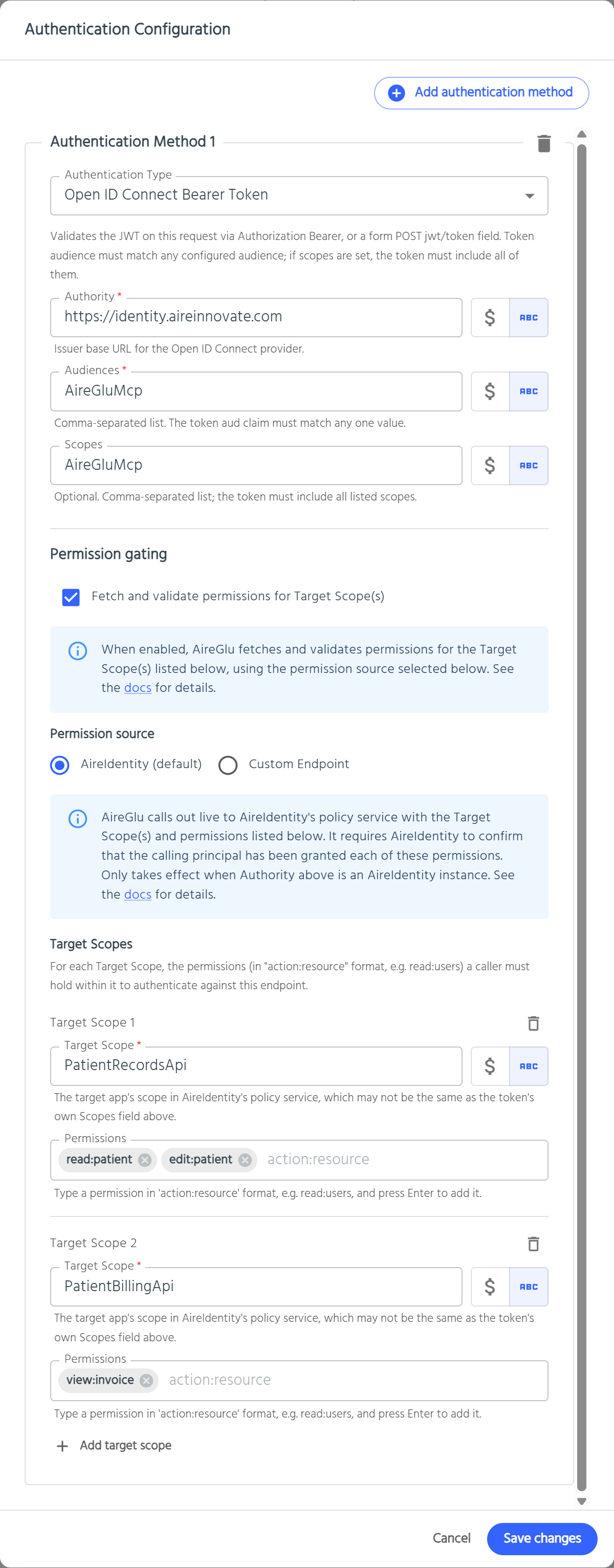
Tool-level access isn't configured on the MCP server. It is configured on the target endpoint, using Permission Gating on its Open ID Connect Bearer Token authentication. Because it lives on the endpoint, the same rule applies whether the endpoint is called as an MCP tool or directly over HTTP.
Setting it up
- Open the endpoint the tool or resource targets.
- Under Authentication, add Open ID Connect Bearer Token:
- Authority: your AireIdentity instance
- Audiences:
AireGluMcp
- Tick Fetch and validate permissions for Target Scope(s) and add the Target Scope(s) and permissions a user needs to use this tool. See Configuring permission gating.
- Save the endpoint. No change is needed on the MCP server.
TIP
AireGluMcp is the only audience you need. Some MCP clients (Claude.ai, Claude Desktop, mcp-remote) receive tokens whose audience is the server's own URL, https://<runtime-host>/mcp/<tenancy>/<server-name>. AireGlu accepts this automatically on MCP calls.
What users see
When a client lists tools or resources, AireGlu checks each gated endpoint against the signed-in user's permissions:
- Allowed: the tool or resource is listed and can be used.
- Not allowed: the tool or resource is left out of the list. The AI assistant never sees it, so it can't try to use it.
Permissions are checked again when a tool is called or a resource is read. If the user's access was removed since the list was fetched, the call returns an error result:
Permission denied: you do not have the required permission for this operation.Endpoints without permission gating are visible to every user who can connect.
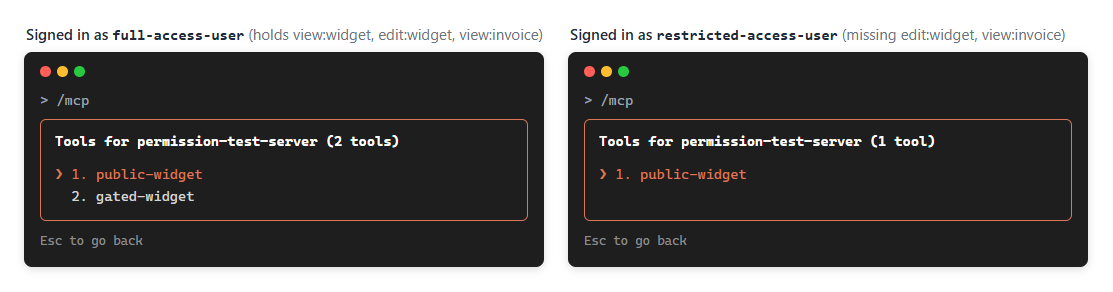
Illustration: the same server viewed with /mcp in Claude Code by a user with the required permissions (left) and one without (right).
Why tools are hidden rather than refused
- The assistant only plans with tools it can use. If a tool appears and then fails, the assistant tends to retry, guess at the cause or work around it. Hiding it avoids that.
- No information leaks. Users can't see the names or descriptions of tools they aren't allowed to use.
- Access changes take effect immediately. Lookups aren't cached, so granting or revoking a role in AireIdentity changes the tool list the next time the client refreshes it.
Things to know
- On MCP calls, only the gated Open ID Connect Bearer Token method is checked. Other authentication methods on the endpoint (for example API Key or IP Address) apply to direct HTTP calls, not to MCP.
- Each gated tool makes a live permission lookup when tools are listed. Gate the tools that need it, not every tool by default.
- If the permission lookup fails, the tool is hidden (fail closed).
Calling downstream APIs as the user
When a tool calls another system, it can use the MCP user's identity instead of a shared service account. The user's MCP token is available to the endpoint's tasks as request.userToken. Exchange it with a Delegate Exchange connection rather than forwarding it:
| Task parameter | Value |
|---|---|
subject_token | {{ request.userToken }} |
scope | {{ authentication.targetScopes[0] }} (or leave blank to use the connection's Target Scope) |
The downstream API then receives a token for the same user, scoped only to that API, and can apply its own record-level rules.
The user's MCP token must carry the delegate_exchange scope, or the exchange is refused. MCP clients request it when the user signs in.
Custom permission source
Tools can be gated on permissions held outside AireIdentity, for example in AireCentre or another identity provider. Set the target endpoint's Permission source to Custom Endpoint and point it at an AireGlu endpoint that looks up the user's permissions. See Custom permission source for how to build that endpoint.
Things to know for MCP:
- The permission source endpoint is called once for each gated tool or resource every time a client lists them, and again when one is called or read. A server with many gated tools makes many lookups, so keep the permission source endpoint fast.
- If the permission source endpoint fails, times out or returns an invalid response, the tool is hidden (fail closed). Check the permission source endpoint's usage data when a tool is unexpectedly missing.
- The Connect layer is unchanged. Users still need
run:McponAireGluMcpin AireIdentity to use the MCP server at all.
Best practices
- Gate tools by the action they perform. Use permissions that describe what the tool does (
read:patient,edit:appointment), granted through AireIdentity roles. - Use clear names and descriptions. Users only see their permitted tools, so each one should make sense on its own.
- Keep data rules downstream. Permission gating controls whether a tool is available, not which records it returns. Use Delegate Exchange so the downstream API can enforce per-user data access.
- Test with more than one user. Connect as a user with the permission and one without, and check the tool list differs as expected. Clear the client's cached sign-in (for
mcp-remote, delete~/.mcp-auth) to switch users.
Troubleshooting
| Issue | Things to check |
|---|---|
| Client connects but every call fails | The user is missing run:Mcp on AireGluMcp. |
| A tool is missing for a user who should have it | Check the user holds every permission in every Target Scope on the target endpoint. Check the endpoint's Authority is AireIdentity and Audiences includes AireGluMcp. |
| A tool is missing for everyone | Check the gated endpoint authenticates successfully without gating (untick it temporarily), and that AireGlu can reach AireIdentity. With a custom permission source, check that endpoint's usage data for errors. |
| Tool shows but returns Permission denied | The user's access changed after the list was fetched. Refresh the client's tool list. |
| Tool fails with a Delegate Exchange error | See Delegate Exchange troubleshooting and the known limitation above. |