
Appearance
Delegate Exchange 1.124.0
The Delegate Exchange connection lets an endpoint call a downstream API as the user who called the endpoint. It takes the caller's own access token and exchanges it at AireIdentity for a new token, scoped to the downstream API, using the OAuth 2.0 Token Exchange grant (RFC 8693).
The exchanged token still identifies the original user (sub), so the downstream API can apply its own per-user access rules.
Why use it
When an endpoint is protected with Open ID Connect Bearer Token authentication, the caller's token is available as request.userToken. You could forward that token unchanged, but this is usually the wrong choice:
Forward request.userToken | Delegate Exchange | |
|---|---|---|
| Audience | Issued for AireGlu (or the MCP server), so a well-configured downstream API should reject it | Issued for the downstream API |
| Scope | Whatever the caller's app asked for, often broader than needed | Only the Target Scope you request |
| Blast radius | A leaked token works anywhere the original token works | A leaked token only works against one downstream API |
| Downstream identity | User | User (sub preserved), with AireGlu as the authorised exchanging client |
Compared to the other connection types:
| Connection | Token represents | Use when |
|---|---|---|
| Client Credentials | AireGlu as an application | The downstream call doesn't depend on who the user is |
| JWT Bearer | AireGlu as an application (signed assertion) | As above, where the provider requires the JWT Bearer grant |
| Delegate Exchange | The calling user, via AireGlu | The downstream API must know who the user is and enforce their access |
Typical uses:
- An AireFrame widget calls an AireGlu endpoint, which reads records from an API that only returns what the signed-in clinician may see.
- An MCP tool fetches data on behalf of the person using the AI assistant, not with a shared service account.
Prerequisites
- A client is registered in AireIdentity for AireGlu to exchange tokens with:
- The Token Exchange grant type is enabled.
- The downstream API's scope is in its allowed scopes.
- It has a client secret.
- The caller's token must be allowed to be exchanged. In AireIdentity this means it carries the
delegate_exchangescope, so the calling application must request it at sign-in.
TIP
Ask your AireIdentity administrator to set up the exchange client. It is a separate client from the one the calling application uses to sign users in.
Creating a Delegate Exchange Connection
- Go to the Connections section in AireGlu.
- Click the Add button.
- Select Delegate Exchange as the connection you want to create.
- Under Connection Details, fill in:
- Key: A unique identifier for this connection (e.g.
patient-records-delegate). This can't be changed after creation. - Display Name: A friendly name for easy reference.
- Client ID: The ID of the exchange client registered in AireIdentity.
- Key: A unique identifier for this connection (e.g.
- Under Credential, select the Client Secret. This is an AireGlu secret that holds the exchange client's secret. Only client secrets are supported; Private Key JWT is not available for this connection type.
- Under Scope & Authority, optionally set:
- Target Scope: The scope to request for the exchanged token (e.g.
PatientRecordsApi). Tasks can override it. - Authority: Leave blank to use AireGlu's AireIdentity instance. Only set it if the exchange must happen at a different identity provider. The caller's token must have been issued by that same authority.
- Target Scope: The scope to request for the exchanged token (e.g.
- Click Save connection.
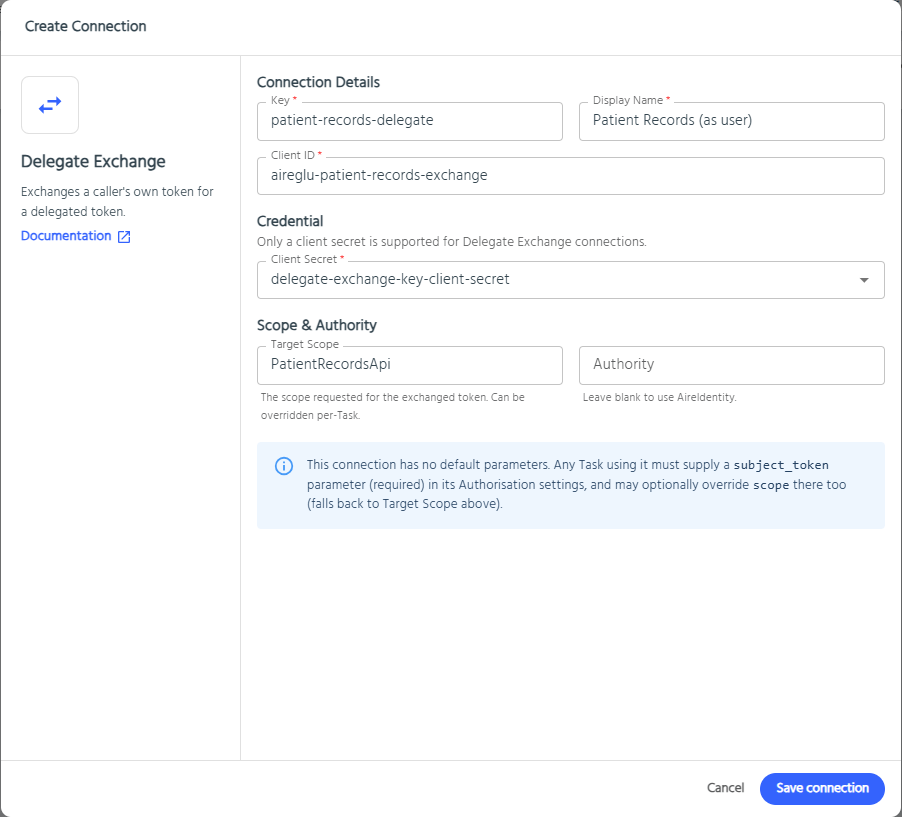
Using a Delegate Exchange Connection in HTTP Request Tasks
Unlike other connection types, a Delegate Exchange connection has no default parameters. The task must say which token to exchange.
- In your endpoint, add or edit an HTTP Request Task.
- Go to the Authorisation tab.
- Set Auth Type to OAuth Connection.
- Search and select your Delegate Exchange connection under Connection Key.
- Under Parameters, click Add Parameter and add:
| Parameter | Required | Value |
|---|---|---|
subject_token | Yes | The token to exchange, normally {{ request.userToken }} |
scope | No | Overrides the connection's Target Scope for this task |
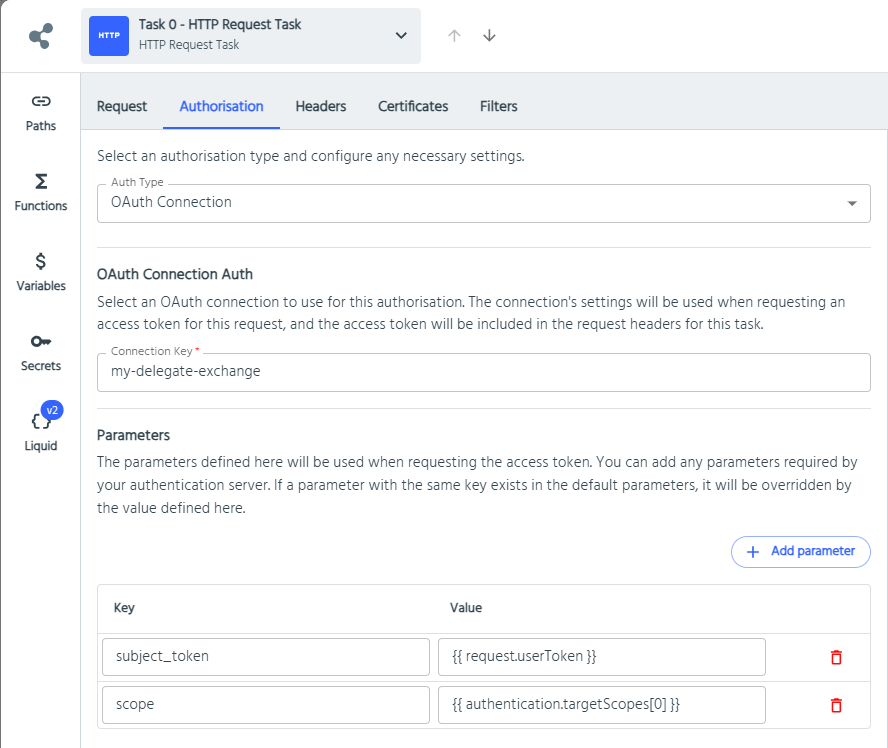
When the task runs, AireGlu:
Renders the
subject_tokenandscopeparameters (Liquid, variables and secrets are resolved).Sends a token exchange request to the authority's token endpoint (found from its
/.well-known/openid-configuration):httpPOST <token endpoint> Content-Type: application/x-www-form-urlencoded grant_type=urn:ietf:params:oauth:grant-type:token-exchange &client_id=<Client ID> &client_secret=<Client Secret> &scope=<scope> &subject_token=<subject_token> &subject_token_type=urn:ietf:params:oauth:token-type:access_tokenAdds the exchanged token to the request as
Authorization: Bearer <token>.Caches the exchanged token until it expires. The cache is per user token, scope and client, so one user's token is never reused for another.
Parameters other than subject_token and scope are ignored for this connection type.
Liquid mapping
Parameter values are Liquid templates, so the subject token and scope can come from the request.
Subject token
liquid
{{ request.userToken }}request.userToken holds the caller's validated access token. It is only populated when the endpoint is authenticated with Open ID Connect Bearer Token, and that also covers endpoints called as MCP tools. Otherwise it is empty and the task fails with "Task is missing a 'subject_token' parameter".
Scope
The scope is resolved in this order:
- The task's
scopeparameter, if it renders to a non-empty value - The connection's Target Scope
- Neither set: the task fails with "No target scope resolvable for this Delegate Exchange connection"
To request the same scope the endpoint is permission gated on, reference the configured Target Scopes:
liquid
{{ authentication.targetScopes[0] }}or, for more than one scope:
liquid
{{ authentication.targetScopes | join: ' ' }}This keeps the gate ("may this user call the endpoint?") and the downstream token ("what may AireGlu do for them?") pointing at the same application. Change the Target Scope in one place and both follow.
TIP
Add a Target Scope with no permissions to an endpoint's Open ID Connect Bearer Token method to make it available in authentication.targetScopes without gating on it.
Example
An endpoint gated on PatientRecordsApi with read:patient, calling the records API as the user:
| Setting | Value |
|---|---|
| Endpoint authentication | Open ID Connect Bearer Token, Target Scope PatientRecordsApi, permission read:patient |
| Connection | Delegate Exchange patient-records-delegate, Target Scope blank |
Task parameter subject_token | {{ request.userToken }} |
Task parameter scope | {{ authentication.targetScopes[0] }} |
Best practices
- Exchange, don't forward. Use Delegate Exchange instead of
Authorization: Bearer {{ request.userToken }}when calling anything other than another AireGlu endpoint that expects the same token. Forwarding hands the downstream system a token that wasn't issued for it. - Request the narrowest scope. Use one Target Scope per downstream API. Avoid reusing one connection with a broad scope across unrelated APIs. Create one connection per downstream API, or override
scopeper task. - One exchange client per purpose. Register a dedicated AireIdentity client for exchange, with only the scopes it needs. Don't reuse the calling application's sign-in client.
- Keep secrets in Secrets. The client secret must be an AireGlu secret reference. Never put the secret, or
request.userToken, into a response, audit output or log message. - Combine with permission gating. Permission gating stops unauthorised users before any exchange happens. Delegate Exchange then gives the downstream API the user's identity for its own data-level checks. Neither replaces the downstream API's own authorisation.
- Leave Authority blank unless you need it. The subject token and the exchange must come from the same identity provider. Overriding Authority only works if the caller's token was issued there.
- Don't use it for non-user traffic. Jobs, receivers and other calls with no signed-in user have no token to exchange. Use Client Credentials for those.
Troubleshooting
A failed exchange fails the HTTP Request Task with "Failed to make request to endpoint at … - …", followed by the reason.
| Message / symptom | Things to check |
|---|---|
| Task is missing a 'subject_token' parameter | Add a subject_token parameter. If it is already {{ request.userToken }}, the endpoint isn't using Open ID Connect Bearer Token authentication, or the request wasn't authenticated with it. |
| No target scope resolvable | Set Target Scope on the connection or a scope task parameter. If you use authentication.targetScopes, check the endpoint has Target Scopes configured (it is empty in Preview). |
| Delegate token exchange failed: Bad Request | Check the exchange client has the Token Exchange grant enabled and the requested scope allowed. Check the caller's token includes the delegate_exchange scope and hasn't expired. |
| Delegate token exchange failed: Unauthorized | Check Client ID and the Client Secret secret value. |
| Downstream API returns 401 | Check the downstream API accepts tokens for the requested scope and audience. |
| Works for one user, not another | The exchanged token carries the user's identity. Check that user's access in the downstream system. |
Related
- Open ID Connect Bearer Token: makes
request.userTokenavailable - Permission Gating: restrict endpoints by the user's permissions
- MCP Permissions: permission-aware MCP tools that call downstream APIs as the user