
Appearance
Permission Gating 1.124.0
Permission gating is an optional extension of Open ID Connect Bearer Token authentication. As well as checking that the caller's token is valid, AireGlu checks that the user behind the token holds specific permissions before the endpoint runs.
Use it when:
- Only some users of an application should be able to call an endpoint (for example, only users who can
edit:widgetshould be able to update a widget) - The endpoint is exposed as an MCP tool or resource and should only be visible to users who are allowed to use it
- Permissions are already managed centrally in AireIdentity and you don't want to repeat them in endpoint logic
How it works
Permission gating runs as part of authentication, after the token has been validated:
- The caller sends a user access token (Bearer header or form POST, see How callers pass a token).
- AireGlu validates the token's signature, issuer, expiry, audience and scopes as normal.
- AireGlu asks the permission source which permissions the user holds in each configured Target Scope, using the caller's own token.
- The caller must hold every listed permission in every gated Target Scope. If anything is missing, the request is refused.
- On success the endpoint runs, and the caller's token is available via liquid within the AireGlu Tasks
request.userToken.
Why it works this way
- The user's own token is used for the lookup. AireIdentity only returns permissions for the user the token belongs to. A caller cannot ask about anyone else's permissions, and AireGlu doesn't need a privileged service account to read them.
- The check is live on every request. Lookups are not cached, so revoking a role or policy in AireIdentity takes effect on the next call. There is no window where a removed user can keep calling the endpoint.
- It fails closed. If the permission source is unreachable, returns an error or returns nothing, the request is rejected. An outage never silently grants access.
- It lives on the endpoint, not on whatever calls it. The same gate applies whether the endpoint is called over HTTP, from an iframe or as an MCP tool. You configure it once.
Configuring permission gating
In the endpoint editor, open Authentication and add (or edit) an Open ID Connect Bearer Token method. Configure Authority, Audiences and optional Scopes as described in Configuring an endpoint, then:
- Under Permission gating, tick Fetch and validate permissions for Target Scope(s).
- Choose a Permission source:
- AireIdentity (default): permissions are read live from AireIdentity's policy service.
- Custom Endpoint: see Custom permission source.
- For each Target Scope:
- Enter the Target Scope, the scope of the target application in the permission source (for example
PatientRecordsApi). - Add the Permissions the caller must hold in that scope. For AireIdentity these are in
action:resourceformat (for exampleread:patient). Type each permission and press Enter.
- Enter the Target Scope, the scope of the target application in the permission source (for example
- Click Add Target Scope to gate on further scopes.
- Save the endpoint.
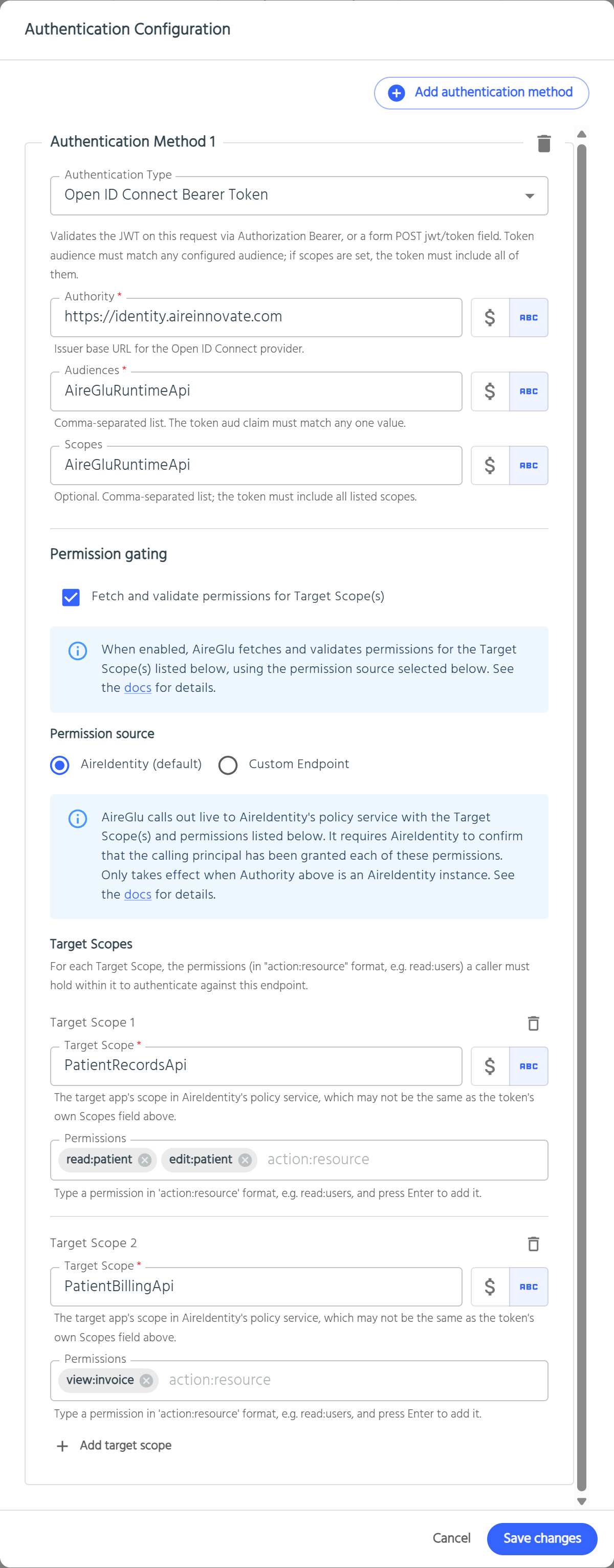
| Field | Required | Description |
|---|---|---|
| Fetch and validate permissions for Target Scope(s) | No | Turns permission gating on. Unticking it removes all Target Scopes. |
| Permission source | Yes, when gating is on | AireIdentity (default) or Custom Endpoint. |
| Target Scope | Yes, per row | The scope in the permission source to check. Supports variables and secrets. Must not contain spaces or commas, and must be unique on the endpoint. |
| Permissions | No | The permissions required in that scope. With AireIdentity, each must be in action:resource format. With Custom Endpoint, each can be any single value with no spaces or commas. Permissions are literal values; variables are not resolved. |
Target Scope vs Scopes
The Scopes field and Target Scope look similar but answer different questions:
| Scopes | Target Scope | |
|---|---|---|
| Checks | The scope claim inside the token | The user's permissions in the permission source (AireIdentity's policy service, or a custom endpoint) |
| Answers | "Was this token issued for this kind of call?" | "Is this user allowed to do this?" |
| Example | AireGluRuntimeApi | PatientRecordsApi |
The Target Scope is usually the scope of the application the endpoint acts for, which is often not a scope the caller's token carries.
Matching rules
- All Target Scopes must pass, and within each one the user must hold all listed permissions (AND, not OR). To allow "either A or B", create separate endpoints or use a custom permission source.
- Scope and permission names are compared case-insensitively.
- A Target Scope with no permissions doesn't trigger a lookup. It still appears in
authentication.targetScopes, which is useful for passing a scope to a Delegate Exchange connection without gating on it. - Only one Open ID Connect Bearer Token method per endpoint version can have Target Scopes.
- If the endpoint has other authentication methods, all of them must still pass.
Requirements
- The Authority must be your AireIdentity instance when using the AireIdentity permission source. Lookups always go to the AireIdentity instance AireGlu itself is configured with, so tokens from third-party identity providers can't be gated this way. To gate them, use a custom permission source.
- With the AireIdentity source, users get permissions through roles and policies in AireIdentity. A user with no role granting the permission is rejected.
What the caller sees 1.125.0
The status code tells the caller why the request was refused, and whether trying again could help.
| Situation | Result |
|---|---|
| Token valid, all permissions held | Endpoint runs |
| Token missing or invalid | 401 Unauthorized. The caller needs a new token. |
| Token valid, a permission missing | 403 Forbidden. The user isn't allowed to call this endpoint. |
| Permission check can't be done because of a setup problem, for example a wrong Target Scope or Authority | 500 Internal Server Error. Fix the configuration; retrying won't help. |
| Permission source returned a response AireGlu can't use | 502 Bad Gateway |
| Permission source is temporarily unavailable, slow or busy | 503 Service Unavailable. The caller can retry later. |
| Called as an MCP tool or resource | See MCP Permissions: the tool is hidden from the user rather than returning an error |
Whatever the failure, the endpoint doesn't run (fail closed).
In the endpoint's usage data, a missing or invalid token is recorded as an Endpoint Authentication Failure, a missing permission as an Endpoint Authorization Failure, and a failed permission check (500, 502 or 503) as an Endpoint Permission Lookup Failure, with a short reason where one is available.
Using target scopes in Liquid
The configured Target Scope names are available in task templates as authentication.targetScopes:
liquid
{{ authentication.targetScopes[0] }}
{{ authentication.targetScopes | join: ' ' }}
This contains the configured scope names (after variables are resolved), not the permissions the user holds. Its main use is to keep the scope you gate on and the scope you request downstream in step. For example, use it as the scope parameter of a Delegate Exchange connection.
authentication.targetScopes is empty in Preview.
Permission gating and downstream calls
Permission gating decides whether the endpoint runs. It doesn't change the credentials the endpoint's tasks use when they call other systems.
If a task calls a downstream API as the user, use a Delegate Exchange connection. It swaps request.userToken for a token scoped to the downstream API. The downstream API should still enforce its own data-level access (for example, which patient records this user may see). Permission gating is the first check, not the only one.
A typical layered setup:
| Layer | Question | Enforced by |
|---|---|---|
| Endpoint | Can this user call this endpoint at all? | Permission gating |
| Downstream credential | What may AireGlu do on this user's behalf? | Delegate Exchange connection, Target Scope on the exchanged token |
| Data | Which records can this user see? | The downstream API |
Best practices
- Gate on the action, not the user. Grant permissions through roles and policies in AireIdentity rather than per-user, so access is managed in one place.
- Keep permission sets small and specific. Required permissions are ANDed, so each one you add narrows who can call the endpoint.
- Use one Target Scope per application. Add a second Target Scope only when the endpoint genuinely acts on two applications (for example records and billing).
- Don't treat gating as data security. Keep record-level checks in the downstream system, and pass the user's identity to it with a Delegate Exchange connection.
- Expect a lookup per request. Each gated call makes a live request to the permission source. For high-volume, non-user traffic, use Client Credentials on a separate endpoint instead.
- Test with a user who lacks the permission. Confirm they get 403 (or don't see the MCP tool) before going live.
Troubleshooting
These apply to both permission sources. For problems specific to a custom permission source, see Troubleshooting a custom permission source.
| Symptom | Things to check |
|---|---|
| 401 | The token itself was rejected, before permissions were checked. See Open ID Connect Bearer Token troubleshooting. |
| 403 for a user who should have access | Check the user holds every listed permission in every Target Scope. With AireIdentity, check their role grants them. Check the Target Scope is the permission source's scope name, not the token's scope. |
| 500 for everyone | A setup problem. Check the usage data reason. With AireIdentity, check the Target Scope is a valid scope in AireIdentity and Authority is your AireIdentity instance. |
| 502 or 503 | The permission source failed or is unavailable. Check the usage data reason. A 503 is usually temporary, so try again later. |
| Permission rejected on save | With AireIdentity, permissions must be action:resource format with no spaces or commas, for example read:patient. |
authentication.targetScopes is empty | It is always empty in Preview. Check the endpoint has an Open ID Connect Bearer Token method with at least one Target Scope. |
Custom permission source
By default, AireGlu asks AireIdentity which permissions a user holds. If an application's permissions are held somewhere else, such as AireCentre, Microsoft Entra or Keycloak, you can build an AireGlu endpoint that answers the same question instead. This is the permission source endpoint.
AireGlu calls the permission source endpoint in place of AireIdentity. Everything else about permission gating stays the same: the caller must still hold every listed permission in every Target Scope, and any failure denies access.
How it works
- The caller sends their access token to the gated endpoint, as normal.
- AireGlu validates the token against the Authority, Audiences and Scopes as normal.
- AireGlu sends a
POSTrequest to the permission source endpoint. The request contains the Target Scopes and permissions to check, and the caller's access token. - The permission source endpoint works out which of those permissions the user holds, typically by calling another system, and returns them.
- AireGlu compares the response with the required permissions. If every required permission is present in every Target Scope, the gated endpoint runs.
Setting it up
- Build the permission source endpoint and save it.
- Open the endpoint you want to gate. Under Authentication, on its Open ID Connect Bearer Token method, tick Fetch and validate permissions for Target Scope(s).
- Under Permission source, select Custom Endpoint.
- Choose the permission source Endpoint and its Version. The list shows every endpoint in the tenant apart from the one you're editing.
- Add the Target Scopes and Permissions. With a custom source, a permission can be any single value with no spaces or commas, for example
Tasks.Read,adminorread:orders. It doesn't need to be inaction:resourceformat. - Save the endpoint.
AireGlu checks the permission source when you save. You'll see an error if the endpoint doesn't exist, the version doesn't exist (including Default when the endpoint has no default version), or the endpoint points at itself.
TIP
With a custom source, the Authority doesn't have to be AireIdentity. AireGlu still validates the token against whichever Authority you set, then leaves the permission check to your endpoint. This lets you gate endpoints for users of third-party identity providers.
Building the permission source endpoint
The permission source endpoint is an ordinary AireGlu endpoint. It must:
- Accept
POSTrequests with a JSON body (see Request). - Return a
200status and a JSON body (see Response).
Request
AireGlu sends this body:
json
{
  "targetScopePermissions": [
    {
      "scope": "OrdersApi",
      "permissions": ["read:orders", "edit:orders"]
    }
  ],
  "accessToken": "eyJhbGciOi..."
}| Field | Description |
|---|---|
targetScopePermissions | One entry per Target Scope that has permissions on the gated endpoint. Target Scopes with no permissions are not sent. |
targetScopePermissions[].scope | The Target Scope name, after variables are resolved. |
targetScopePermissions[].permissions | The permissions the gated endpoint requires in that scope. |
accessToken | The caller's access token, unchanged. Use it to look the user up, or exchange it with a Delegate Exchange connection to call another system as the user. |
Paste the example above into the endpoint's input dialog so the schema is generated and the fields are available in Liquid, for example {{ data.accessToken }} and {{ data.targetScopePermissions }}.
The accessToken is sent in the body, not as a header. AireGlu doesn't use it to authenticate the call; it's there so your tasks can use it.
Response
Return the permissions the user holds, grouped by scope:
json
{
  "scopePermissions": [
    {
      "scope": "OrdersApi",
      "permissions": ["read:orders"]
    }
  ]
}| Field | Description |
|---|---|
scopePermissions | Required. One entry per scope. An empty list ([]) means the user holds nothing. |
scopePermissions[].scope | The scope name. Must match a Target Scope from the request. |
scopePermissions[].permissions | The permissions the user holds in that scope. |
How AireGlu reads the response:
- Scope and permission names are matched exactly, ignoring case.
- A scope that is missing from the response counts as "no permissions held" in that scope.
- Extra scopes or permissions the gated endpoint didn't ask for are ignored. You can return everything the user holds, or only the requested permissions they hold.
- In the example above, the user holds
read:ordersbut notedit:orders, so access is denied.
You decide how the endpoint works out the user's permissions. For example, it could call AireCentre or another API with an HTTP Request task, then build the response with an HTTP Response task.
Failures, retries and timeouts 1.125.0
To deny a user, return 200 without the permission. Don't return an error status such as 403: AireGlu treats any non-success status as the permission source endpoint failing, not as a decision about the user.
The lookup fails closed. Access is denied, and the caller gets the status shown, if the permission source endpoint:
| Permission source endpoint | Caller gets |
|---|---|
Can't be reached, returns 408, 429, 502, 503 or 504, or doesn't respond in time | 503 |
Returns any other non-success status, including 500, 400 and 404 | 502 |
Returns a body that is empty, isn't JSON, or has no scopePermissions field | 502 |
If the endpoint can't be reached or returns 408, 429, 502, 503 or 504, AireGlu retries once after about half a second. Other errors, including 500, are not retried. The whole lookup, including the retry, must finish within 15 seconds.
When the permission source endpoint fails, it is logged in usage data and sends its own error email, the same as any other endpoint. The lookup carries the gated request's transaction and correlation IDs, so you can find both calls together in usage data.
There is no caching. The permission source endpoint is called on every request to the gated endpoint (and, for MCP, every time a gated tool is listed or called).
Best practices for the permission source endpoint
- Use Internal Only authentication. Don't give it an Open ID Connect method or a permission source of its own. Nothing outside AireGlu should be able to call it.
- Keep Debug Mode off. The request contains the caller's access token. With Debug Mode on, it would be stored with the debug data.
- Don't log or map the access token. Only pass
accessTokento the task that needs it, such as a Delegate Exchange connection. Don't write it to an audit, email, response or any other output. - Don't delete or re-version it while it's in use. Gated endpoints look it up by name and version. If it's removed, or the selected version (or Default) changes to something that doesn't return the expected response, every gated endpoint that uses it denies access.
- Keep it fast. It runs before every gated request, so slow lookups slow down every call.
- Make it read-only. It may be called twice for one request (because of the retry), so it shouldn't change anything.
Troubleshooting a custom permission source
| Gated endpoint returns | Things to check |
|---|---|
| 403 for a user who should have access | Check the permission source endpoint's response. Each scope must match a Target Scope, and permissions must include every required permission (case doesn't matter). |
| 502 for everyone | Check the permission source endpoint's usage data for errors. Check it accepts POST and returns 200 with a scopePermissions field. |
| 503 | The permission source endpoint, or a system it calls, is unavailable or took longer than 15 seconds. |
| Permission rejected on save | Each permission must be a single value with no spaces or commas. |
| Permission source endpoint rejected on save | Check the endpoint exists, isn't the endpoint you're editing, and has the selected version. If you chose Default, check the endpoint has a default version set. |