
Appearance
Liquid Templating
Liquid is a templating language developed by Shopify for simplifying more complex data and structuring requirements. AireGlu uses an implementation of this in order to allow you more control over complex data shaping. A full guide on Liquid can be found on Shopify's documentation. It is recommended that you familiarise yourself with this if you are going to use the Liquid syntax in your endpoints.
AireGlu implements the Shopify Liquid specification as much as possible, but due to AireGlu-specific requirements and different underlying technologies, there are some differences. This page will focus on the AireGlu specifics; to see the specification differences between our own implementation and Shopify's, as well as the differences between our Liquid engine versions, please see the Specification Differences page.
V1 and V2 Liquid engines
Currently all endpoint tasks that have been created will be using our V1 Liquid engine. This is an older version of Liquid with fewer features and more differences to the current Shopify Liquid specification. Any new tasks created will now make use of our updated V2 Liquid engine. To see which Liquid engine version your task is using, check the Liquid icon on the left of your task dialog.
Over time we will be adding features to allow for the older V1 Liquid tasks to be upgraded to V2. Please note that receivers will be automatically upgraded to V2 without any manual intervention required.
Data shape
You can access data relating to the input and tasks within your endpoint (via input and tasks), as well as some data regarding the endpoint run (request). The data property is for convenience, and is identical to input. The exact data shape will vary depending on the construction of your endpoint.
Please note that casing matters, therefore {{ correlationId }} will work but {{ CORRELATIONID }} would not.
Please see the Property Access section for more information on what properties can be accessed and the casing required. Note that the casing required to access endpoint properties (e.g. endpoint.tasks[0]) also differs between our V1 and V2 Liquid engines - see AireGlu Defined Properties on the Specification Differences page for details.
If you had a mapping task (named mapping-task) and an HTTP Response Handler (named api-resp) the Liquid data shape is:
json
{
  "input": { // refers to same object as `data`
    "example": {
      "inner-example": "This is an inner example"
    },
    "EXAMPLE": {
      "INNER-EXAMPLE": "This is an uppercase inner example"
    }
  },
  "data": { // refers to same object as `input`
    "example": {
      "inner-example": "This is an inner example"
    },
    "EXAMPLE": {
      "INNER-EXAMPLE": "This is an uppercase inner example"
    }
  },
  "correlationId": "<GuidOrString>",
  "transactionId": "<Guid>",
  "parameters": {
    "mySingleValueParam": "value",
    "myMultiValueParam": "valueA,valueB"
  },
  "parametersArrayed": {
    "mySingleValueParam": ["value"],
    "myMultiValueParam": ["valueA", "valueB"]
  },
  "tasks": ["result of mapping-task", "result of api-resp"],
  "endpoint": {
    // V1 Liquid Engine:
    "Name": "SimpleEndpointDemo",
    "Tasks": [
      {
        "Format": "XML",
        "StatusCode": 200,
        "Result": "result of mapping-task",
        "Success": true,
        "ContentType": "application/xml",
        "RedirectUrl": null
      },
      {
        "Format": "JSON",
        "StatusCode": 404,
        "Result": "result of api-resp",
        "Success": false,
        "ContentType": "text/json",
        "RedirectUrl": null
      }
    ],
    // V2 Liquid Engine:
    "name": "SimpleEndpointDemo",
    "tasks": [
      {
        "format": "XML",
        "statusCode": 200,
        "result": "result of mapping-task",
        "success": true,
        "contentType": "application/xml",
        "redirectUrl": null
      },
      {
        "format": "JSON",
        "statusCode": 404,
        "result": "result of api-resp",
        "success": false,
        "contentType": "text/json",
        "redirectUrl": null
      }
    ]
  },
  "request": {
    "paths": {
      "original": "/my/custom/route",
      "redirected": "/endpointName/1"
    },
    "headers": {
      "my-header": "value" // accessing headers is case-insensitive e.g. MY-HEADER would also work
    },
    "userToken": "" // populated when Open ID Connect Bearer Token authentication is configured and the caller passes a valid token
  }
}
XML input mapping
If your endpoint's input is XML, it gets converted into the input/data object using the following rules:
- XML attributes and elements are both accessed in the same way e.g. given
<Order id="1"><Status>Open</Status></Order>, you can access bothinput.idandinput.Status. - If an attribute and a child element share the same name, the attribute takes precedence.
- An element with no child elements or attributes of its own resolves to a plain string e.g.
<Name>Widget</Name>lets you accessinput.Nameand get back"Widget". - An element which does have child elements or attributes resolves to an object you can continue to access further properties on e.g.
<Customer><Name>Widget</Name></Customer>lets you accessinput.Customer.Name. - If there is more than one element with the same name at the same level, they are combined into an array, letting you use
.size,.first,.last, or{% for %}on them.
There is an important difference between our V1 and V2 Liquid engines regarding what happens when there is only a single element with a given name, rather than several. Please see XML single vs multiple elements on the Specification Differences page.
Task results
Note that if you need to access a property on a task result you should use the tasks[0].propertyOne syntax. If you need the whole result including (for XML or HTML) the outer element and any declarations, then you should use the endpoint.Tasks[0].Result syntax.
If the result is rendered in a stringified format and you need it as an object then you can use the raw filter to convert to an object. 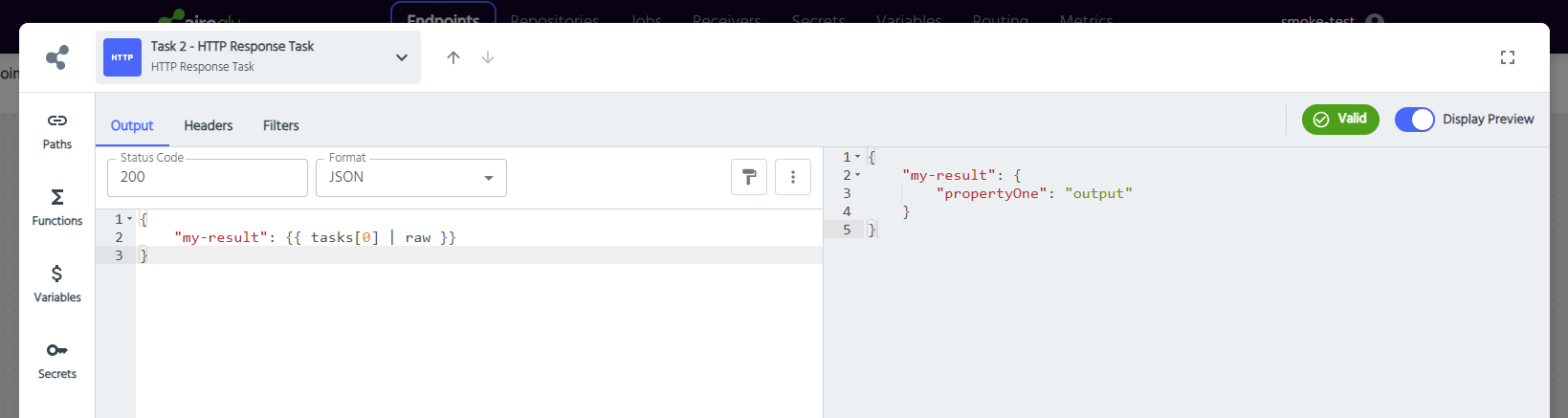
Query string parameters
parameters and parametersArrayed can be used to access the raw parameters used when calling the endpoint. For example if an endpoint is called with the following parameters ?myParam=1&anotherParam=2 you can access them in either of the following ways:
parameters.myParamandparameters.anotherParamorparameters.myParam[0]andparameters.anotherParam[0]
If the same parameter is included multiple times in the query string then parameters will combine them into a comma-delimited string, whilst parametersArrayed will provide them in an array. For example if an endpoint is called with the following parameters ?myParam=1&myParam=2 then parameters.myParam would return "1,2" whilst parametersArrayed.myParam would return ["1","2"].
Headers
Any headers the request was called with can be accessed using the property request.headers.myheadername. Accessing headers is case-insensitive, therefore request.headers.MYHEADERNAME would also point to the same property.
- Some headers, such as x-aireglu-auth and apikey, are blacklisted. These headers cannot be mapped via Liquid. For an up to date list of blacklisted headers contact your system admin.
User token
When an endpoint uses Open ID Connect Bearer Token authentication and the caller passes a valid access token, the validated token is available as request.userToken.
If the endpoint does not use this authentication method, request.userToken is an empty string.
Example use in an HTTP Request task header:
liquid
Authorization: Bearer {{ request.userToken }}request.userToken contains the full access token. Avoid logging it in usage data, audit output, or HTTP responses unless required.
Tasks format
endpoint.Tasks[0].Format can be any of the following:
JSON,XML,QueryString,HL7v2,HL7FHIRJSON,HL7FHIRXML,HTML,None,Text,Turtle
Route mapping
If you have invoked an endpoint using a custom route you will have access to the following properties:
json
{
  "request": {
    "paths": {
      "original": "/my/custom/route",
      "redirected": "/endpointName/1"
    }
  }
}
See Route Mapping for more information
Looping through items
Some items, such as querystring params or headers, can be looped via Liquid. Here is an example that lists all the headers in a request:
"headers": {
    {% for header in request.headers %}
        "{{header[0] | downcase}}": "{{header[1]}}"{% unless forloop.last %},{% endunless %}
    {% endfor %}
}
Receivers
You are also able to use Liquid as part of your receivers. Please see the Receivers section to see which data you can access via Liquid. All Liquid receivers will use our V2 Liquid engine.
Property Access
Please find below an extensive list of what can and cannot be accessed via Liquid in AireGlu, and the casing that must be used:
| Expression | Valid? | Notes |
|---|---|---|
{{ data }} | ✅ | |
{{ DATA }} | ❌ | |
{{ input }} | ✅ | |
{{ INPUT }} | ❌ | |
{{ data.testObject }} | ✅ | Must match the property case e.g. {{ data.TestObject }} would be valid Liquid but it would point to a different property. |
{{ data.testObject.testInnerObject }} | ✅ | Must match the property case e.g. {{ data.TestObject.TestInnerObject }} would be valid Liquid but it would point to a different property. |
{{ correlationId }} | ✅ | |
{{ CORRELATIONID }} | ❌ | |
{{ transactionId }} | ✅ | |
{{ TRANSACTIONID }} | ❌ | |
{{ parameters }} | ❌ | |
{{ PARAMETERS }} | ❌ | |
{{ parametersArrayed }} | ❌ | |
{{ PARAMETERSARRAYED }} | ❌ | |
{{ parameters.test }} | ✅ | Must match the property case e.g. {{ parameters.TEST }} would be valid Liquid but it would point to a different property. However, if you had both test and TEST as query parameters, they would instead fall under one array e.g. ["test", "TEST"] as opposed to two separate arrays of ["test"] and ["TEST"]. It is recommended to keep the casing the same or choose a different name for different parameters. |
{{ parametersArrayed.test }} | ✅ | Same casing caveat as parameters.test above. |
{{ tasks }} | ✅ | |
{{ TASKS }} | ❌ | |
{{ tasks.property }} | ✅ | Must match the property case e.g. {{ tasks.PROPERTY }} would be valid Liquid but it would point to a different property. |
{{ tasks.property.innerProperty }} | ✅ | Must match the property case e.g. {{ tasks.PROPERTY.INNERPROPERTY }} would be valid Liquid but it would point to a different property. |
{{ endpoint }} | ❌ | |
{{ ENDPOINT }} | ❌ |
Please note the casing below is for our V2 Liquid engine. V1 would have endpoint.Tasks[0].Result instead, for example. Please see the Liquid V1 and V2 differences here.
| Expression | Valid? | Notes |
|---|---|---|
{{ endpoint.tasks }} | ❌ | |
{{ endpoint.TASKS }} | ❌ | |
{{ endpoint.tasks[0].result }} | ✅ | |
{{ endpoint.tasks[0].result.innerProperty }} | ❌ | |
{{ request }} | ✅ | |
{{ REQUEST }} | ❌ | |
{{ request.paths }} | ✅ | |
{{ request.PATHS }} | ❌ | |
{{ request.headers }} | ❌ | |
{{ request.HEADERS }} | ❌ | |
{{ request.paths.method }} | ✅ | |
{{ request.paths.METHOD }} | ❌ | |
{{ request.headers.accept }} | ✅ | Case-insensitive e.g. ACCEPT and AcCEpT would point to the same object. |
{{ request.userToken }} | ✅ | Populated when Open ID Connect Bearer Token authentication succeeds. Empty string otherwise. |
{{ request.USERTOKEN }} | ❌ |