
Appearance
Running an Endpoint
AireGlu endpoints can be invoked with an API call or using other AireGlu features such as Jobs. You can invoke a specific version of an endpoint or always invoke the default version, which can be easily updated at any time.
Setting the default version
When you are creating or editing an endpoint version, you can quickly set it to be the default version for that endpoint in the publish settings panel prior to saving: 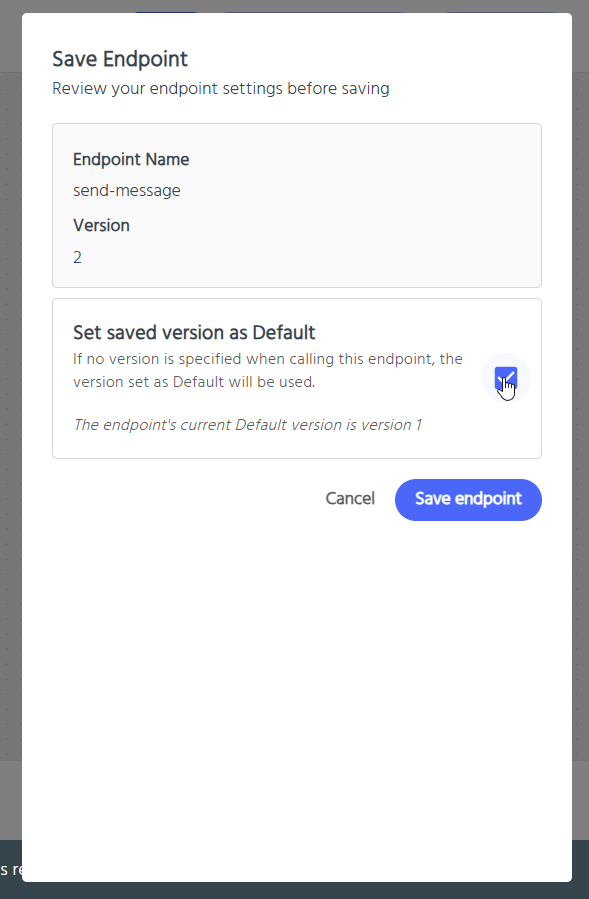
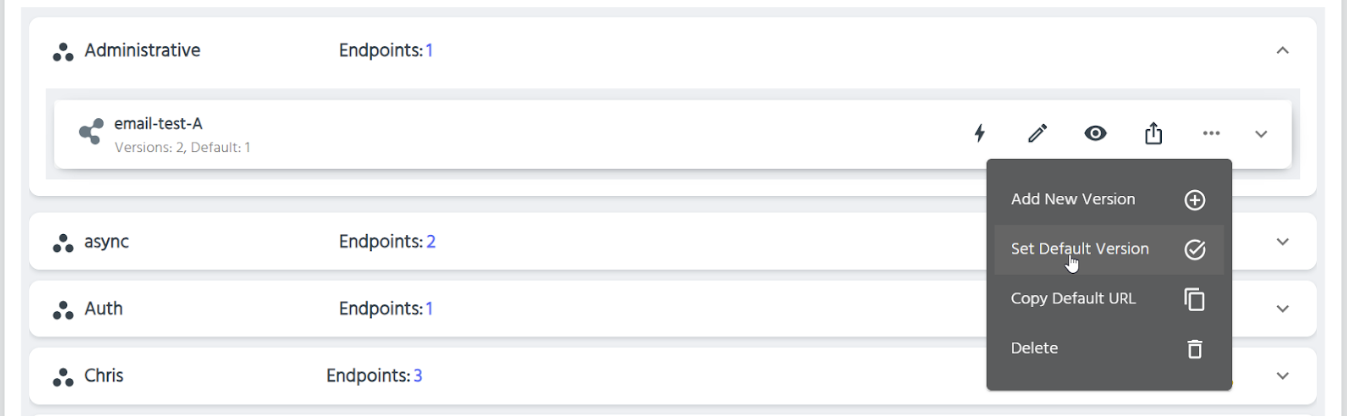
You can also manage the default version for an endpoint from the endpoints list:
- Select the three dots (more actions) displayed on the endpoint in the endpoints list:
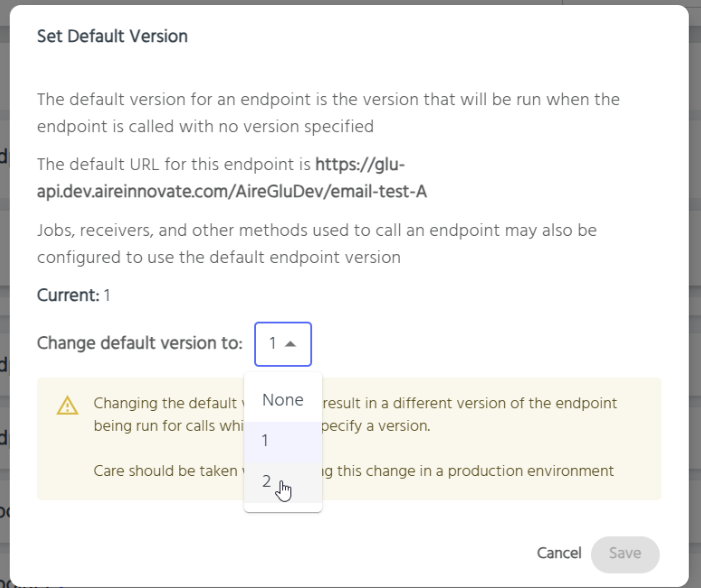
- Select the version you want to be the default:
Transaction ID and Correlation ID
Transaction ID
Each endpoint run is associated with a transaction ID. This is automatically generated, or you can pass in your own transaction ID using a query parameter transactionId=<guid>.
You can access the transaction ID within an endpoint by using Liquid via transactionId.
What is a Business Transaction?
A business transaction represents a single logical unit of work. One business transaction may involve multiple endpoint calls, batch invocations, or other operations - but they all share the same transaction ID and can be viewed together in the Usage Data.
For example:
- Endpoint A calls Endpoint B, which calls Endpoint C → 1 business transaction
- Endpoint A triggers a batch invocation that processes 100 items → 1 business transaction
- A scheduled job runs and calls multiple endpoints → 1 business transaction
Automatic Propagation
When your endpoint calls another endpoint (via HTTP Request task) or invokes the Batch API, the transaction ID is automatically propagated. You don't need to do anything - all downstream calls will share the same transaction ID.
This means:
- All related operations appear together when filtering by Transaction ID in the Usage Data
- You can trace the full flow of a request through multiple endpoints
When to provide a custom Transaction ID
You only need to provide a custom transaction ID (?transactionId=<guid>) if you want to use your own identifier for tracking purposes. This is useful when:
- You have an external reference ID you want to correlate with AireGlu activity
- You need to match AireGlu transactions with records in other systems
If you don't provide one, AireGlu will generate a unique ID automatically.
New Business Transactions
The following always start a new business transaction:
- Any external request to an endpoint (without a transaction ID being passed in)
- Scheduled job executions
- Receiver invocations (Fax, SMS)
- Direct calls to the Batch API from external systems
Correlation ID
Each endpoint run is also associated with a correlation ID. This is commonly used by other AireSuite products to link together steps in a broader journey, beyond a single transaction. Like the transaction ID, the correlation ID will be automatically generated within AireGlu unless one is passed in. To pass in a correlation ID, the endpoint should be called with the x-correlation-id header. This will be automatically applied when called by an AireSuite product. AireGlu will also apply this header when making outgoing HTTP requests.
As with the transaction ID, the correlation ID will be passed on automatically to subsequent endpoint calls. If your endpoint run creates a job, the correlation ID will be applied to the endpoint invoked by that job. The correlation ID will also be passed on to batch invocations.
You can access the correlation ID within an endpoint by using Liquid via correlationId